Part 3: Working with large-scale data
Intro to Computational Studies in Education and the Social Sciences
Step 1: Load Packages
We’ll start with a guided example using data on Historically Black Colleges and Universities.
Step 2: Load the data
library(tidyverse)
hbcu <- read_csv("https://raw.githubusercontent.com/quant-shop/intro-comp-educ-soc/refs/heads/main/data/hbcu_data.csv")

# View the first few rows
head(hbcu)
# A tibble: 6 × 7
name city state founded lat lon type
<chr> <chr> <chr> <dbl> <dbl> <dbl> <chr>
1 Alabama A&M University Normal AL 1875 34.8 -86.6 Public, 4 Year
2 Alabama State University Montgomery AL 1867 32.4 -86.3 Public, 4 Year
3 Albany State University Albany GA 1903 31.6 -84.2 Public, 4 Year
4 Alcorn State University Lorman MS 1871 31.9 -91.1 Public, 4 Year
5 Allen University Columbia SC 1870 34.0 -81.0 Private, 4 Year
6 American Baptist College Nashville TN 1924 36.2 -86.8 Private, 4 YearRows: 102
Columns: 7
$ name <chr> "Alabama A&M University", "Alabama State University", "Albany …
$ city <chr> "Normal", "Montgomery", "Albany", "Lorman", "Columbia", "Nashv…
$ state <chr> "AL", "AL", "GA", "MS", "SC", "TN", "AR", "SC", "NC", "FL", "A…
$ founded <dbl> 1875, 1867, 1903, 1871, 1870, 1924, 1884, 1870, 1873, 1904, 19…
$ lat <dbl> 34.7834, 32.3643, 31.5785, 31.8769, 34.0298, 36.1659, 34.7465,…
$ lon <dbl> -86.5683, -86.2952, -84.1543, -91.1458, -81.0115, -86.7844, -9…
$ type <chr> "Public, 4 Year", "Public, 4 Year", "Public, 4 Year", "Public,… name city state founded
Length:102 Length:102 Length:102 Min. :1837
Class :character Class :character Class :character 1st Qu.:1870
Mode :character Mode :character Mode :character Median :1886
Mean :1895
3rd Qu.:1905
Max. :1988
lat lon type
Min. :18.34 Min. :-98.50 Length:102
1st Qu.:32.48 1st Qu.:-90.13 Class :character
Median :34.02 Median :-84.64 Mode :character
Mean :34.31 Mean :-85.13
3rd Qu.:36.17 3rd Qu.:-80.78
Max. :39.93 Max. :-64.96 Step 3: Clean the data
Step 4: Basic Exploration
How many institutions are in the data set?
What is the distribution by HBCU type?
# A tibble: 5 × 2
  type                     n
  <fct>                <int>
1 Private, 4 Year         45
2 Public, 4 Year          40
3 Public, 2 Year          11
4 Private, Specialized     4
5 Private, 2 Year          2
Step 5: Historical Analysis
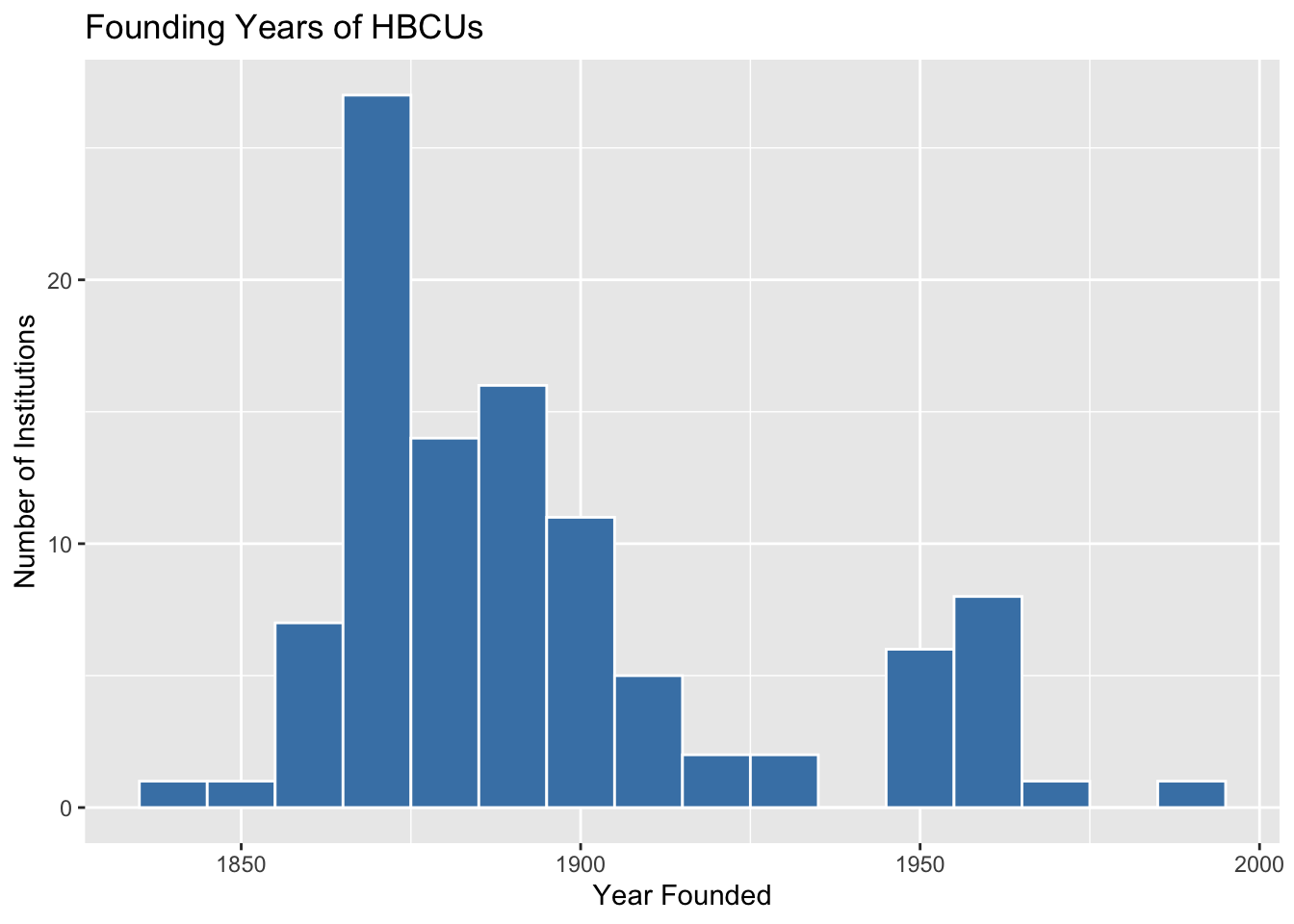
When were the HBCUs founded?
hbcu %>%
  ggplot(aes(x = founded)) +
  geom_histogram(binwidth = 10, fill = "steelblue", color = "white") +
  labs(
    title = "Founding Years of HBCUs",
    x = "Year Founded",
    y = "Number of Institutions"
  )
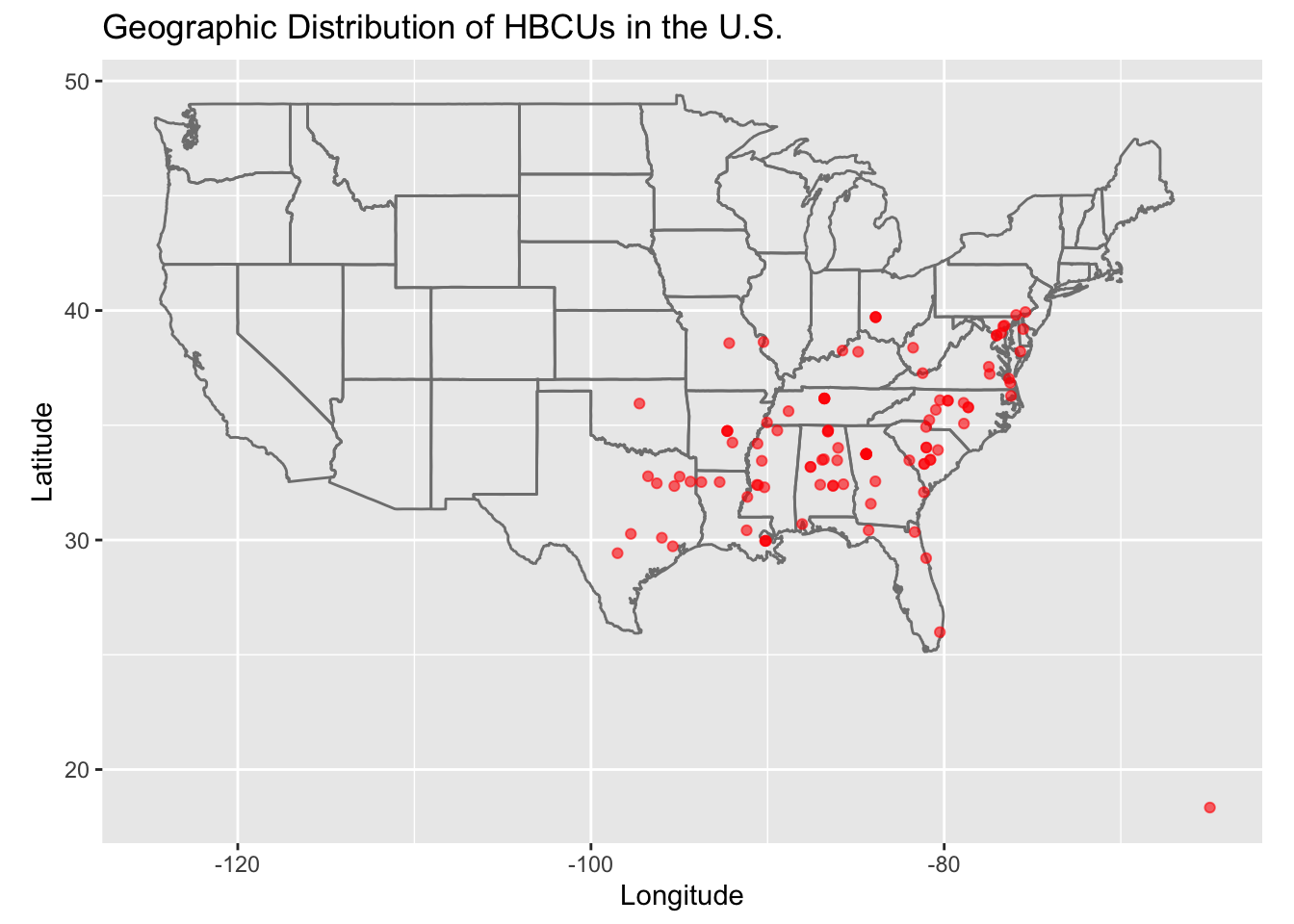
Step 6: Geographic Distribution
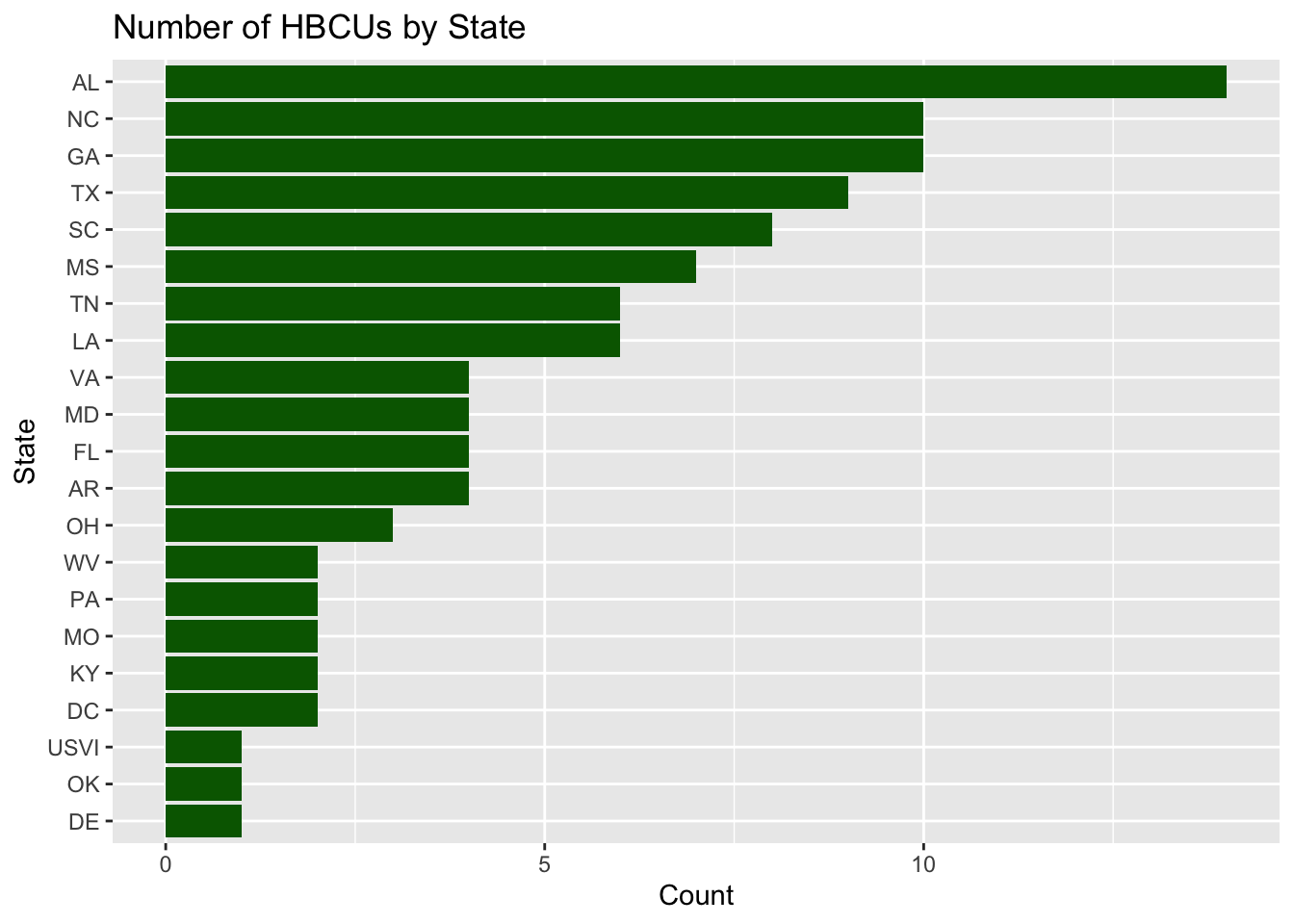
HBCUs by state
# A tibble: 21 × 2
   state     n
   <fct> <int>
 1 AL       14
 2 GA       10
 3 NC       10
 4 TX        9
 5 SC        8
 6 MS        7
 7 LA        6
 8 TN        6
 9 AR        4
10 FL        4
# ℹ 11 more rows
Basic visualization of HBCUs by state
hbcu %>%
  count(state) %>%
  ggplot(aes(x = reorder(state, n), y = n)) +
  geom_col(fill = "darkgreen") +
  coord_flip() +
  labs(
    title = "Number of HBCUs by State",
    x = "State",
    y = "Count"
  )